AXLR8’s popular Email2IR product accepts an email to a set address and automatically creates a unique new case.
Here is how it works. As you can see in the flowchart below, the incoming email creates a unique item which could become an IR (Information Request). This might be real or judged as spam or vexatious by a human operator. In the latter case, it goes “in the bin”.
If the email is about a running IR, then the job reference in the subject line will stop it creating a new ticket reference. If the subject line contains the code “demoshireIR:12345”, then it will join other emails in the “job bag” for Information Request reference “12345” without creating a new IR. If there is no subject line reference then it will create a new IR and give it a unique number.
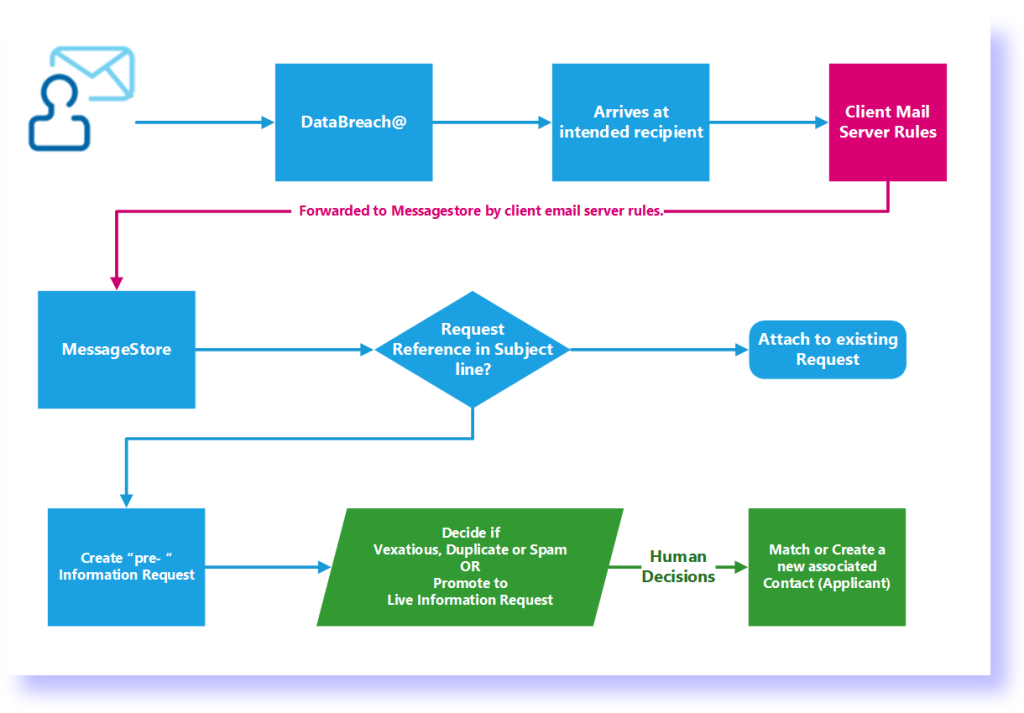
Then the human operator (assuming they have not spammed the request) starts to process it. The process varies from organisation to organisation but it starts with a search assisted decision on whether this is a new applicant or a frequent flier and all the things that keep contact data clean. This helps GDPR compliance as any duplicates for applicants increase the work of complying with requests and automating retention policies.
The technical bit
How does the email actually get processed? It uses AXLR8’s MessageStore functionality.
You can read the specific details of how it would work with (e.g) foi@<myorganisation>.gov.<countrypostfix) here. This example is for the commonest public sector email server implementation MS365 or MS Exchange. We have been doing this for more than two decades during that time the system has been rewritten several times as different versions arrived. It has also given us a great ability to pick up other market leaders like G-Suite and also we still have skills in-house for systems that are still in common use that you might be far too young to have heard of.