Simple! It comes as standard. The data you have stored needs to be checked and then it can be made public.
Good practice will mean it does not take long to check. However, some public bodies may have used their system for ten years before deciding to publish their PDL. In this case, it may be wise to review those practices immediately. Then, read the responses thoroughly to make sure the data is ready for publication.
For example, a Notes field may contain “scratchpad items” such as email addresses and phone numbers. These should not be exposed. Likewise, your team may never have ticked anything as public. The system will provide a very sparse PDL!
Once that process is started, the business can ask AXLR8 not to publish any IRs before a chosen date. For example, you might check back to 01/01/2025 and ask that none raised before that date are published.
Check list for Launching your PDL
- Check all SARs, sensitive FOI and other private Request Types are not marked as “Public” in Request Type Admin. Make sure all FOI and EIR “Request Types” are Public.
- Make sure there are only FOI and EIR requests and any others that are OK to publish.
- Check no documents or notes have been marked as public which should not have been.
- Decide if you wish to exclude any Status values (for example part completed responses that are not yet redacted/signed off or Requests being clarified)
- Ask us for the URL to check the Disclosure Log internally.
- Make sure that the responses do not contain any files or text mistakenly added in which should not be available externally.
- Adjust the stylesheet options available to you with AXLR8 Support so that the PDL complies with your branding requirements and accessibility.
- Ask AXLR8 to “release it into the wild”.
- Link it on your website.
Please contact us if you need any assistance.
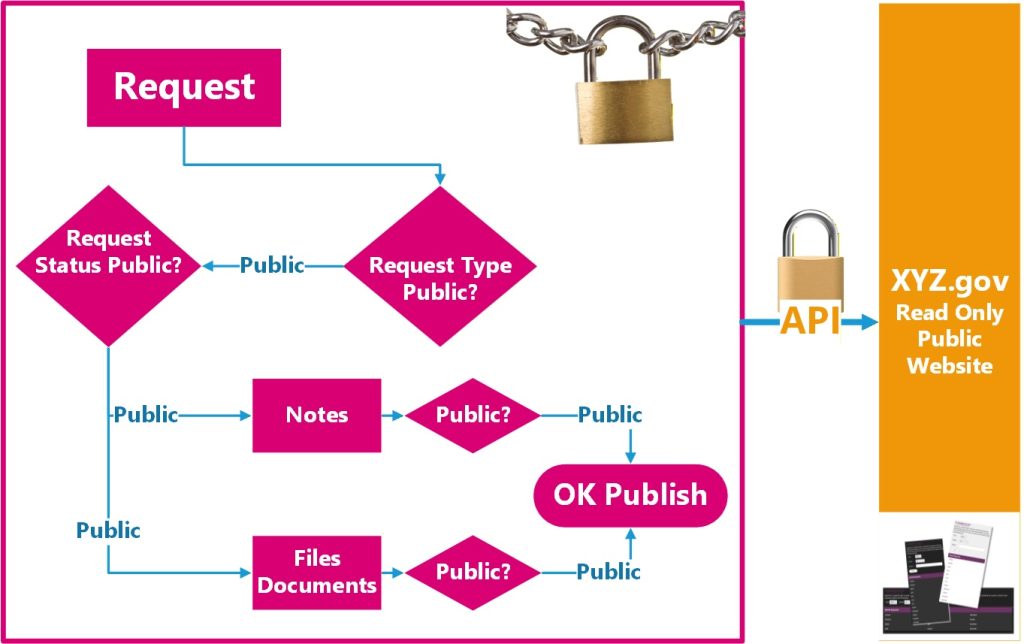
Please also see the article introducing how to configure your PDL.
API
Alternatively, you can always use the API. This API pulls data from your AXLR8 system. You can then place it in your own website. This is more flexible (and costly) than using our standard solution. You will need web developer, in-house or hired in. They will need to program the data extraction through the API and present it in an accessible form on your business website.
Support
Don’t forget, you can always call AXLR8 for help 01344 776500 or email support@AXLR8.com.